- Call Us: +34 605 074 544
- Email us:


News OpenKM version 8.2.9 Version 8.2.x
Version 8.2.9 includes all the improvements incorporated in the 8.1.22 version, and additionally introduces the following exclusive new features:
Details View for Documents and Emails
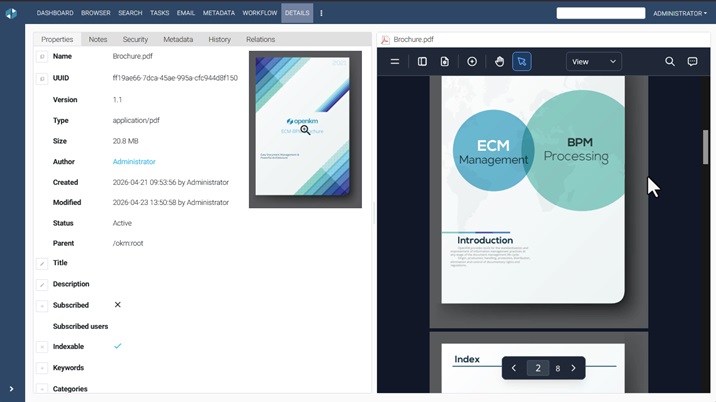
OpenKM introduces the new Details View, designed to improve the experience when working with documents and emails.
With a single click, the properties panel moves to the left while the document viewer expands to use the entire right side, providing a larger preview without losing quick access to the document's information.
Analytics: Repository Insights and Statistics
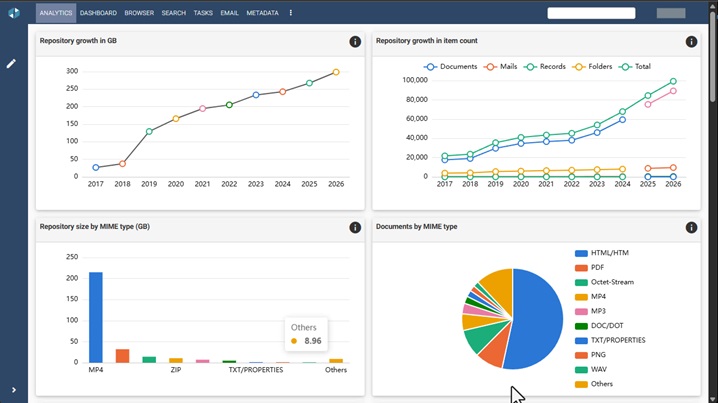
The new Analytics tab provides an overview of the repository through charts, metrics, and statistics. It allows you to analyze repository growth, the number and distribution of documents, emails, records, and folders, content size by MIME type, average document size, and folders with the largest number of items.
Live Edit Now Available for Linux
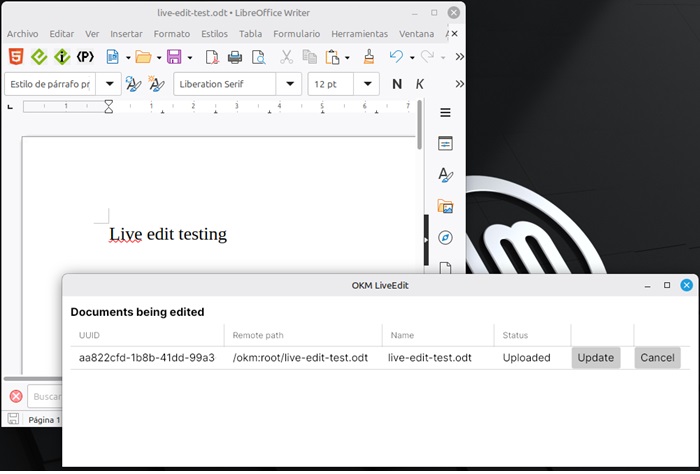
OpenKM introduces Live Edit for Linux, a new version of the tool that allows users to edit documents stored in the OpenKM repository directly from compatible desktop applications. Changes made while editing can be synchronized with OpenKM and saved as a new document version.
Contact us
Cookie preferences