- Call Us: +34 605 074 544
- Email us:


Be updated, subscribe to the OpenKM news
OpenKM BillManager: the solution for managing, classifying, and accounting for invoices
Written by Ana Canteli on 13 February 2026
If you run a small or medium-sized business, this scene will probably sound familiar: paper invoices piling up, PDFs arriving by email, receipts photographed on your phone, loose delivery notes… and then, at the end of the month (or quarter), the rush to send everything to your accounting firm, reconcile incoming and outgoing payments, and prepare taxes such as Form 303.
The problem isn’t only the time it takes. It’s also the risk: lost documents, duplicate versions, data-entry mistakes, payment delays, and doubts about whether the information is properly stored and protected.
This is precisely where OpenKM BillManager fits in—a ready-to-use solution designed for small and medium-sized companies that don’t have their own servers, but still need to handle accounting and tax-related tasks securely and easily.
A real case: a small business that wants order and control without complexity
The company has very common needs:
- Upload invoices from different channels (scanner, mobile, email).
- Automatically extract data (customer/supplier, date, invoice number, amount, VAT, etc.).
- Classify and archive by customer/supplier and by year/month.
- Link delivery notes to supplier invoices to make sure everything matches.
- Send invoices to customers automatically, with traceability.
- Generate reports on paid and outstanding invoices to control cash flow.
- Export a monthly or quarterly CSV to send to the accounting firm and post-entries faster.
- Prepare the information needed to make Form 303 easier to complete.
All of this offered as a service with an affordable monthly fee, starting at €75/month.
The OpenKM BillManager solution
OpenKM BillManager, your invoice control and management centre, acts as an intelligent repository: it receives, understands, and organizes your documents, and it also produces useful outputs for accounting (CSV files, reports) and internal processes (automatic sending, validations, document linking).
Most importantly: because it’s offered as a service, you can simply start using it.
Step by step: what happens when you upload an invoice
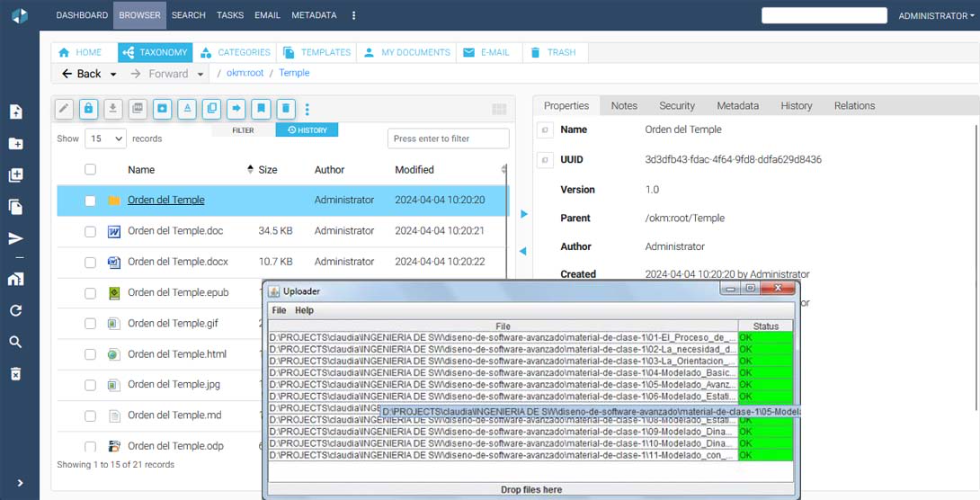
1) Document intake through multiple channels (frictionless)
The company can upload documents naturally:
- Scanner / multifunction device (and optionally via a hotfolder).
- Photo from a mobile phone (ideal for paper invoices).
- Email attachment (received, captured, and processed).
2) Document type detection (invoice vs delivery note)
OpenKM identifies the document type (for example: customer invoice, supplier invoice, delivery note). This is essential because each type follows different rules.
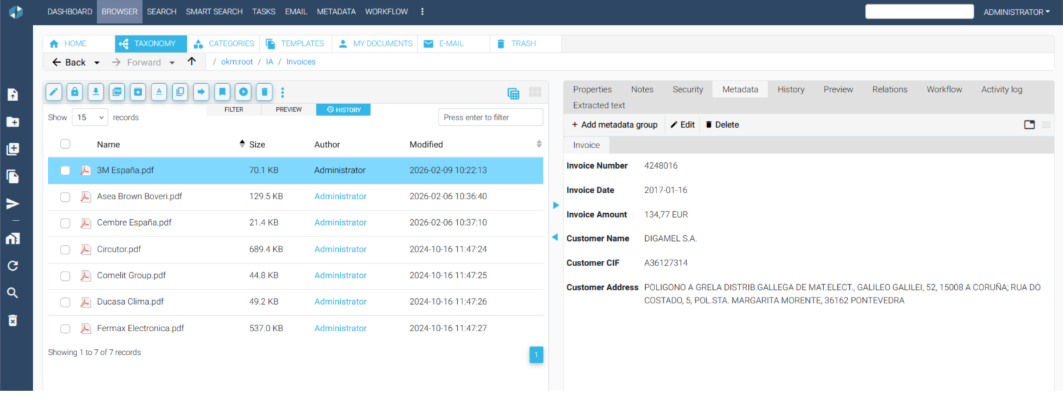
3) Automatic metadata extraction (AI/OCR)
Once the document is identified, the solution automatically extracts useful fields such as:
- Company/customer/supplier
- Invoice date
- Invoice number
- Taxable base, VAT, total
- Description/concept (if applicable)
This removes much of the manual work and reduces typical typing errors.
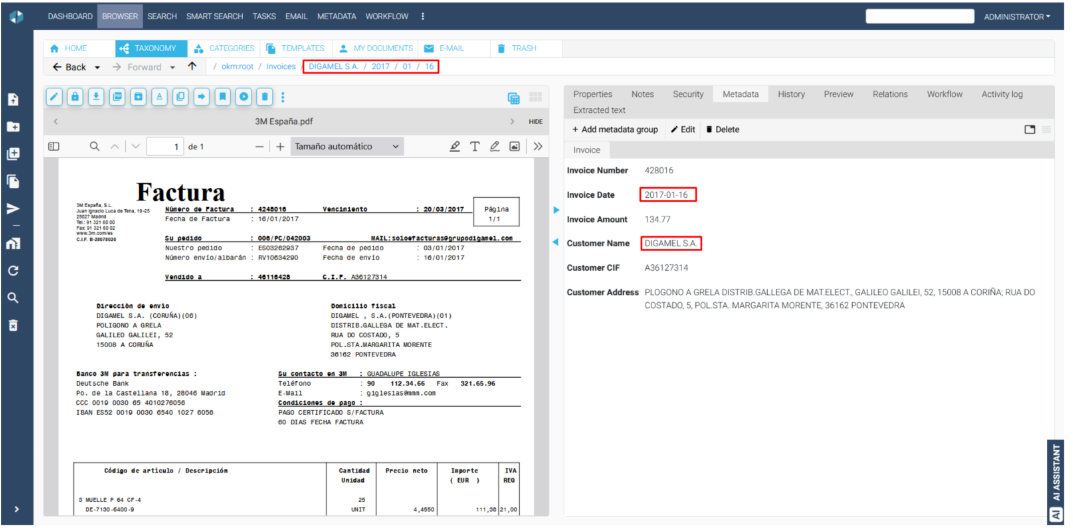
4) Automatic indexing and filing by customer/supplier, year, and month
OpenKM doesn’t just “store” the PDF: it files it properly, following a clear structure:
- Customer/Supplier
- Year
- Month
- Document
- Month
- Year
This makes it possible for anyone to find an invoice in seconds, even months later.
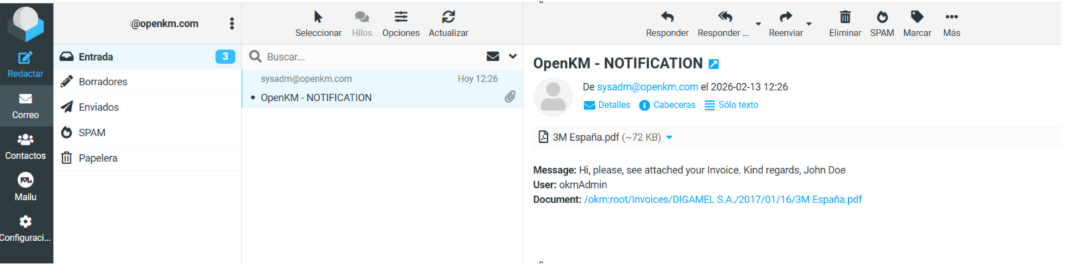
Commercial automation: invoices to customers with automatic email delivery
For invoices issued to customers, the system can automatically send an email with the invoice attached (and, if desired, with a corporate template). The result:
- Less administrative work
- Faster, consistent sending
- Better customer experience
- Traceability of the process
Internal control: linking delivery notes and supplier invoices
In purchasing, the chaos often comes from here: delivery notes on one side, invoices on the other.
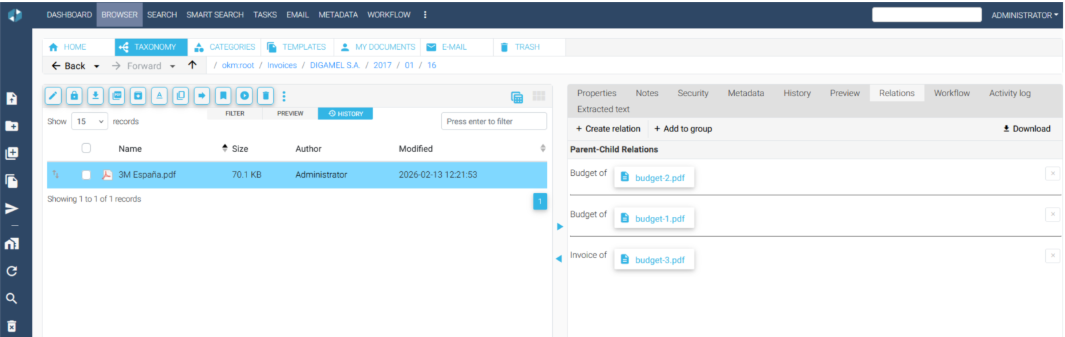
With OpenKM, delivery notes are linked to the corresponding invoice. This makes it possible to:
- Verify that what was invoiced matches what was received
- Avoid duplicates
- Keep ordered documentary evidence for audits or claims
Accounting & taxes: CSV for the accounting firm and data ready for Form 303
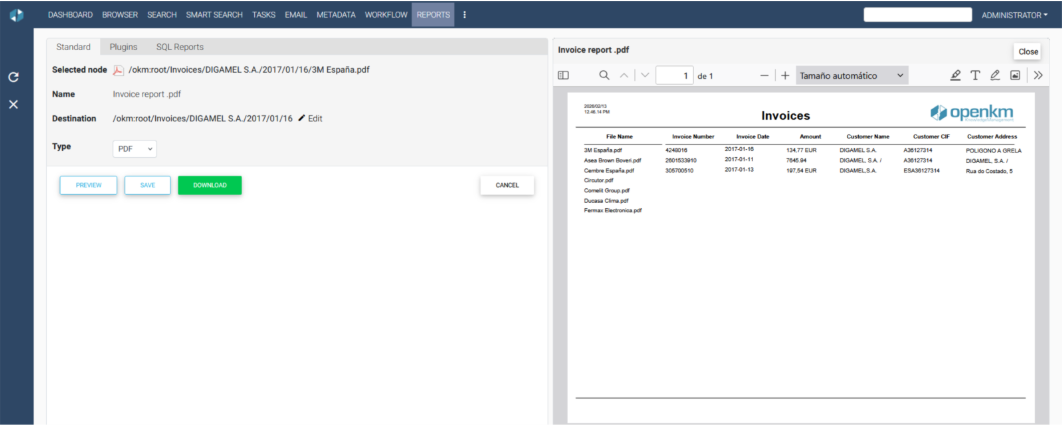
This is the “sweet spot” for many small businesses: OpenKM lets you download a CSV containing metadata (and/or statuses) to send to your accounting firm every month or quarter.
With that CSV, the accounting firm can post entries faster and with fewer errors. And because the data is structured (bases, VAT, totals, dates), OpenKM helps you prepare and review the information needed for obligations such as Form 303 (VAT), avoiding manual searches and last-minute surprises.
Important: the goal is to automate data capture and preparation so Form 303 is easier and more reliable (final filing depends on each accounting firm’s procedure).
Paid vs outstanding reports: cash flow under control
Another practical advantage: OpenKM can help you generate reports for:
- Invoices pending collection
- Invoices pending payment
- Invoices already paid/collected
This provides a small operational “balance” to support decisions: prioritize payments, follow up collections, and forecast cash.
Security and confidentiality (no on-premise servers)
Many small businesses don’t have internal IT or infrastructure, but they do have a real problem: sensitive documents (finance, suppliers, customers) that should not be scattered across emails or personal folders.
With OpenKM Cloud, you centralize documentation and can rely on:
- Role-based access control
- Traceability (who uploads/views/downloads)
- Order and document consistency
- Lower risk of information loss
Why this solution fits SMEs
Because it’s not an endless project or a generic tool you need to build from scratch. It’s already prepared for invoice management:
- Upload documents → the system understands and classifies
- Extract data → files automatically
- Export CSV → accounting becomes smoother
- Reports → cash control
- Automatic sending → fewer repetitive tasks
And all of this with OpenKM BillManager for less than €100 per month, without servers and without complexity.
Want to see it with your own documents?
If you are an SME (or an accounting firm) looking for a simple way to automate invoices, gain order, and reduce administrative time, this vertical solution is built for you.
Contact us and we will show you:
- How to upload invoices (scanner, mobile, email)
- How metadata is extracted and filing happens automatically
- How the CSV is generated for your accounting firm
- How paid/outstanding status and delivery note–invoice links are managed
Contact us
Cookie preferences